 Wrenfold Labs
Guides / Battery
Battery full alarm for Android: get told at 80% or 100%
Most Android phones show on the lock screen when charging has finished, but they don't tell you out loud, and they say nothing at 80%. A battery full alarm does: your phone speaks when the battery reaches the level you pick, so you can unplug in time.
Why people unplug at 80%
Phone batteries wear more slowly when they aren't kept at a full charge for long. That is why Samsung and Google now build an 80% limit into their own phones. Unplugging around 80% when it suits you, and keeping the phone cool while it charges, are the two habits most often recommended.
Option 1: your phone's own 80% limit
Some phones can stop charging at 80% by themselves. Where to look:
- Samsung Galaxy (One UI 6.1 or later): Settings > Battery > Battery protection, then choose Maximum. Older Samsung software calls it Protect battery and stops at 85%.
- Google Pixel (recent models, from the December 2024 update): Settings > Battery > Battery health > Charging optimization, then choose Limit to 80%.
- Other brands: the name and menu change from model to model. Look under Settings > Battery for battery protection, optimized charging or a charge limit. Many phones don't have one.
The exact setting for OnePlus, Xiaomi, realme, Motorola and other brands is in our guide on how to stop charging at 80% on Android.
A built-in limit stops charging quietly, and it doesn't exist on every phone. If yours has none, or you want to hear when the battery gets there, use an alarm instead.
Option 2: a spoken battery alarm with Evoke
Evoke is a free app that speaks your own message when the battery reaches your level. It works on Android 8.0 or newer.
- Install Evoke from Google Play and open it.
- Tap New alert, then Battery level. For the quickest start, add the ready-made Unplug at 80% alert in one tap instead.
- Choose Rises to and set 80%. For a full battery alarm, set 100%.
- Keep Only while charging on.
- Tap Next and write what Evoke should say, for example "Battery at 80 percent. Time to unplug." Tap Hear it to check the sound.
- Tap Done. If the checklist "Make sure your alerts ring" shows anything still off, allow it.
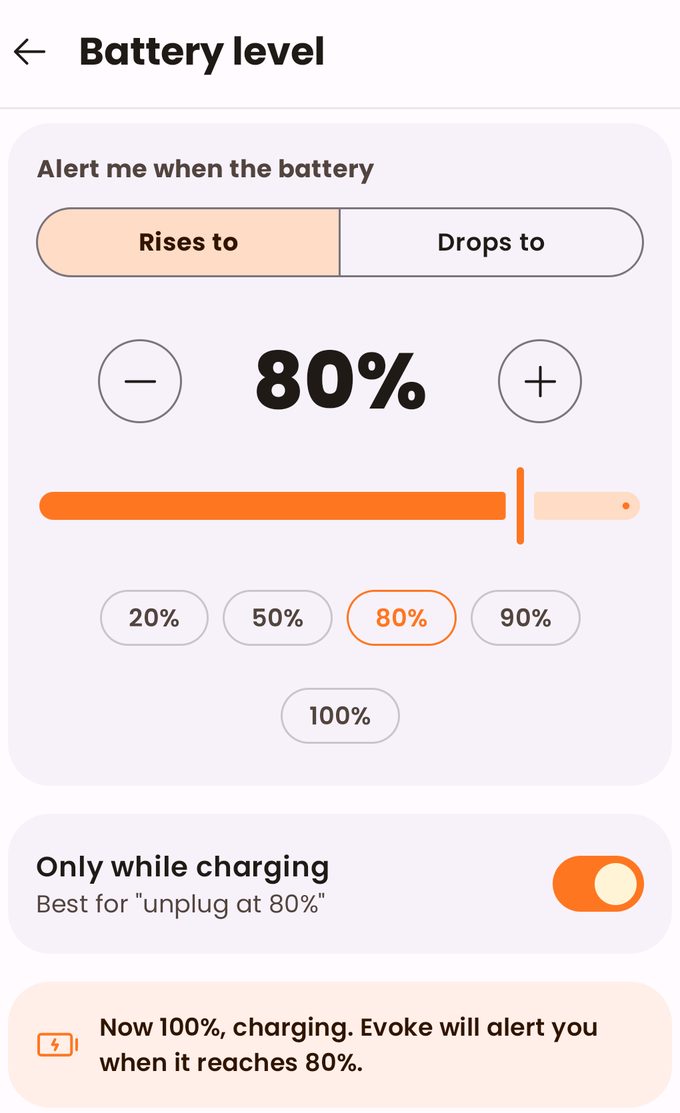
Add a low battery alarm too
Make a second alert, choose Drops to and set 15%. Evoke turns Only while charging off for you, because the battery only drops when the phone is unplugged.
If you don't hear it
- Media volume. Evoke speaks through the media volume. If it is muted, Evoke tells you when you tap Hear it.
- Background limits. Some phones stop apps in the background to save battery. Allow what Evoke's checklist asks for. On Xiaomi, Vivo, OPPO and Realme phones that includes Autostart.
Questions
Can an app stop charging at 80%?
No. Android doesn't let apps control charging. Only a limit built into the phone can stop it. Evoke tells you when to unplug.
Does it speak when the screen is off?
Yes, as long as your phone lets Evoke run in the background. The checklist in the app shows what to allow.
Is it free?
Yes. The free version includes 3 battery or charger alerts and shows ads. Pro, a one-time purchase, removes the limits and the ads.
Get a spoken alert at 80%. Free on Google Play.