 Wrenfold Labs
Guides / Battery
How to stop charging at 80% on Android
Most recent Android phones can stop at 80% by themselves. On a Pixel, go to Settings > Battery > Battery health > Charging optimization and choose Limit to 80%. On a Samsung with One UI 6.1 or later, go to Settings > Battery > Battery protection and choose Maximum. Other brands keep it under Battery or Battery health. If your phone has no limit, no app can stop the charging, but an app can tell you when to unplug.
Why stop at 80%
Phone batteries wear out faster when they sit at a full charge for hours, and faster still when they're warm. Stopping at 80%, mainly overnight or when the phone stays plugged in at a desk, slows that wear. That's why Google, Samsung and Motorola now build an 80% option into their phones.
The trade-off is simple: you start the day with about a fifth less charge. If you have a long day ahead, switch the limit off the night before, or plug in again later.
Google Pixel: Limit to 80%
- Open Settings > Battery > Battery health.
- Tap Charging optimization.
- Turn on Use charging optimization, then choose Limit to 80%.
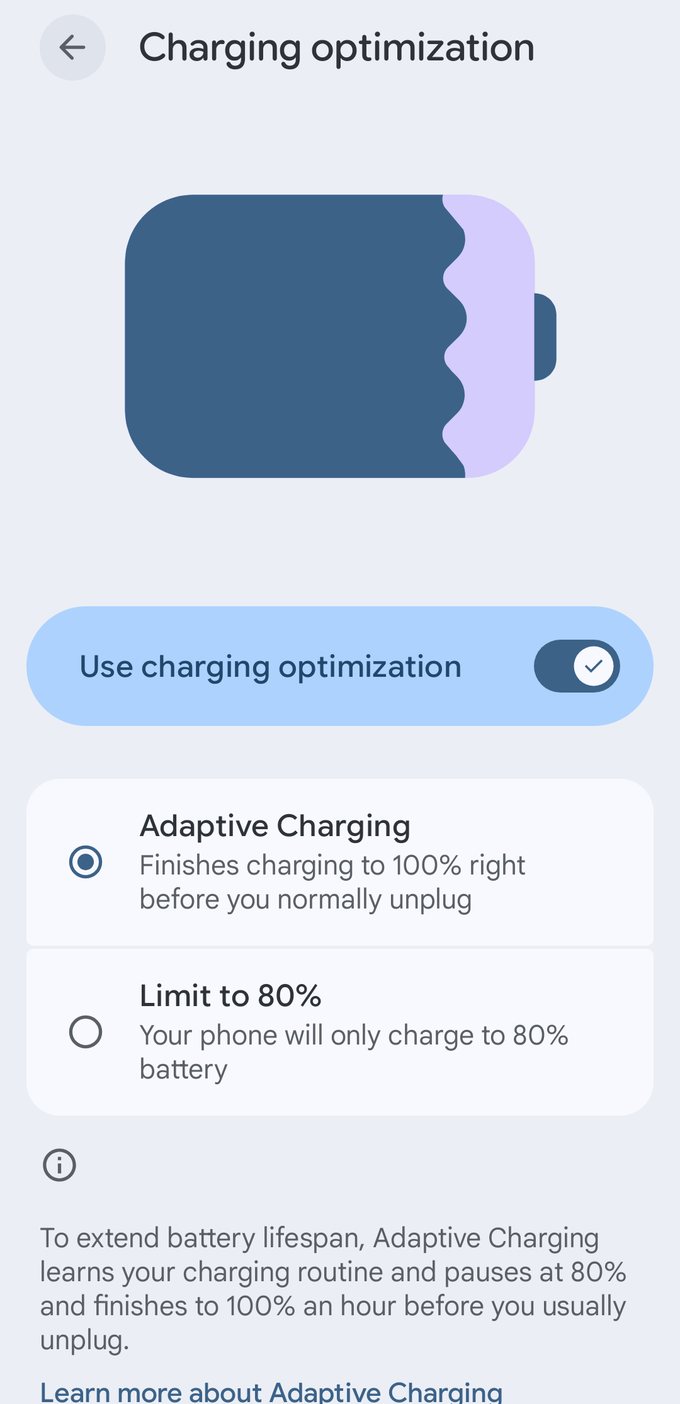
The other choice, Adaptive Charging, pauses at 80% overnight and finishes charging about an hour before you usually unplug. Limit to 80% stops at 80% every time. Google says that when the limit is on and the phone stays plugged in at 80%, it runs on charger power instead of the battery.
The option arrived in a Pixel update in late 2024. If you don't see it, update the phone in Settings > System > Software updates.
Samsung Galaxy: Battery protection
On phones with One UI 6.1 or later, go to Settings > Battery > Battery protection, turn it on and pick a mode:
- Basic charges to 100%, then waits until the battery drops to 95% before charging again.
- Adaptive holds at 80% while you sleep and finishes before you usually wake up. On some newer versions this sits inside Basic as a sleep-time option.
- Maximum stops at 80%. With One UI 7 and later you can choose 80%, 85%, 90% or 95%.
On older phones with One UI 4 or 5, the switch is at Settings > Battery and device care > Battery > More battery settings > Protect battery, and it stops at 85%. Battery protection is off until you turn it on.
OnePlus: charging limit
On OxygenOS 15, go to Settings > Battery > Battery health and turn on the charging limit, which stops at 80%. Newer OxygenOS versions let you choose the limit, from 80% to 100% in 5% steps. Older OnePlus phones only have Optimized charging, which holds at 80% overnight and finishes before you wake up.
Xiaomi, Redmi and POCO: Battery protection
On HyperOS, go to Settings > Battery > Battery protection. You'll see a fixed 80% limit and a smart option that learns your routine and decides each day whether to charge past 80%. Not every model has it. If it's missing, check for a HyperOS update first.
realme and OPPO: Charging limit
On realme UI 6.0, go to Settings > Battery > Battery health and turn on Charging limit. realme says the phone then stops charging at 80%.
OPPO's ColorOS shares much of the same software. Look in Settings > Battery > Battery health for a charging limit or an optimised night charging option. Which one you get depends on the model and the ColorOS version.
Motorola: Battery protection
Go to Settings > Battery > Battery protection. Some lower-cost models call it Overcharge protection and offer fewer choices.
- Smart schedule learns your routine and finishes charging about an hour before you usually unplug.
- Manual schedule lets you hold at 80% Always, or only during hours you choose.
Need 100% once? Unplug and plug in again. Motorola also switches the feature off on its own if the phone hasn't reached 100% for seven days in a row, so the battery gets a full charge.
vivo, iQOO and Nothing
We couldn't find an official fixed 80% limit on vivo or iQOO phones. Some models have a smart charging option under Battery that learns when you unplug. On Nothing phones, Settings > Battery > Battery health has Adaptive charging, which holds at 80% overnight when you have an alarm set, but not a limit you can leave on all day.
If your phone is in this group, or the setting isn't there, use the method below.
No 80% setting? Get told when to unplug
Android doesn't let apps stop charging. Only the phone's own software can do that (or a rooted phone, which we don't recommend). What an app can do is tell you the moment the battery reaches 80%, so you unplug yourself.
With Evoke, our free battery alarm:
- Tap New alert, then Battery level.
- Choose Rises to and set 80%.
- Keep Only while charging on.
- Write what Evoke should say, such as "Battery at 80 percent. Time to unplug." Tap Hear it to check.
Evoke also has a ready-made Unplug at 80% alert you can add in one tap. More detail is in our guide to a battery full alarm at 80% or 100%.
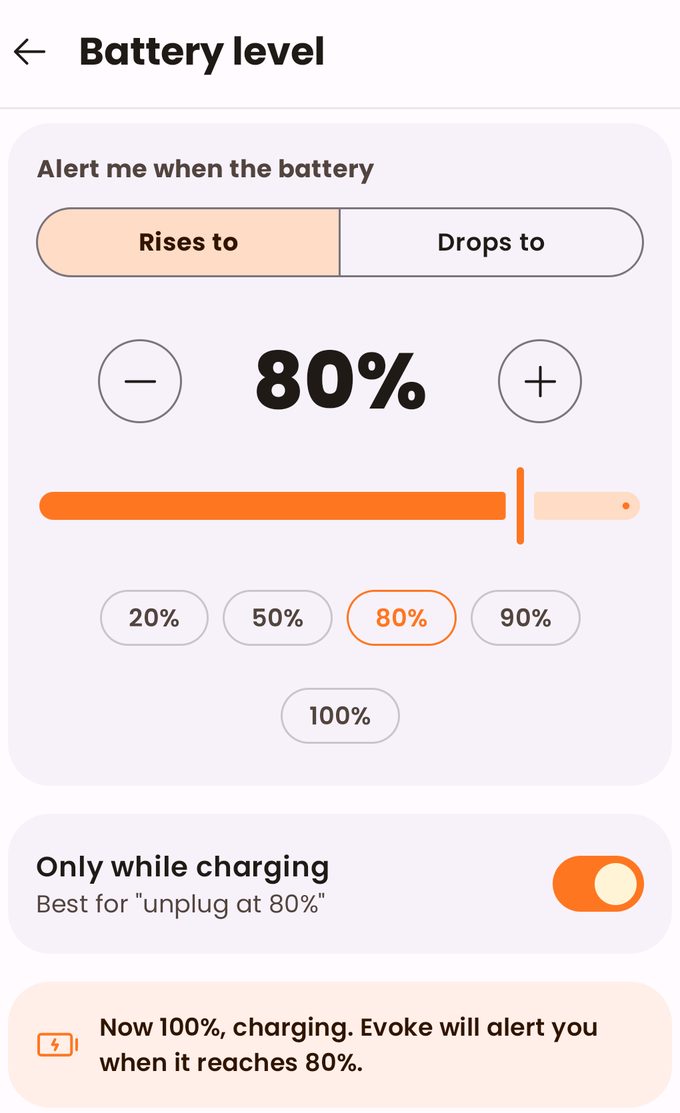
Get told at 80%. Evoke is free on Google Play.

Questions
Is it bad to charge my phone to 100%?
Not now and then. What wears a battery is sitting at 100% for hours, especially when it's warm. Charging to 100% before a long day is fine.
Does stopping at 80% really make the battery last longer?
It slows the wear, which is why phone makers now offer it. How much it helps depends on how you use the phone: it matters most if your phone sits on the charger overnight or all day.
Can an app stop charging at 80% without root?
No. Android doesn't give apps that control. Apps can only alert you, so you unplug.
Samsung battery protection: 80% or 90%?
80% protects the battery most. 90% gives you more charge each day with a little more wear. If the phone is plugged in for long stretches every day, choose 80%.
Why does my phone stop charging at 80%?
A limit or an adaptive charging option is on. Turn it off in the same menu listed above for your brand, or unplug and plug in again where your phone allows that.
- Google Pixel Help: Charging optimization
- Android Authority: Google confirms Pixel runs on charger power at the 80% limit
- PhoneArena: One UI 7 Maximum battery protection levels
- Android Authority: OnePlus charging limit
- Gizchina: HyperOS battery protection
- realme Support: Charging limit in Battery health
- Motorola Help: Prevent overcharging
- Nothing Community: battery charge limit