 Wrenfold Labs
Guides / Dates
How to get birthday reminders on Android, days before
Google Contacts can remind you of birthdays saved in your contacts, on the day or up to two weeks before, though the feature is still reaching phones. For full control, add each birthday to Google Calendar as a yearly all-day event with notifications a week and a day before. Or use a reminder app like Evoke, which reminds you 3 days before, 1 day before and on the day.
Option 1: Google Contacts
If the birthdays are already in your contacts, start here. In the Google Contacts app:
- Open the Highlights tab. If you see an Add birthdays card, use it to add dates for many contacts at once.
- Or open one contact, tap the pencil to edit, and add a significant date labelled Birthday.
- Set a notification for the birthday: on the day, or a few days to two weeks before.
Google is adding these reminders gradually, so the cards and options may not have reached your phone yet. Updating Google Contacts from the Play Store helps.
Option 2: a yearly event in Google Calendar
Google Calendar shows birthdays from your contacts on its Birthdays calendar, but its options for reminding you about them are limited. A birthday you add as your own event gets the full set:
- Tap + and choose Event. Name it, for example "Mom's birthday".
- Turn on All-day and pick the date.
- Change Does not repeat to Every year.
- Add notifications, such as 1 week before and 1 day before, then save.
Option 3: a reminder app, days ahead
A reminder on the day itself is often too late to order a gift or plan a call. Evoke is built for dates like this:
- Tap New alert, then Special date, then Birthday.
- Enter the name and the date. Birthday repeats every year.
- Keep the reminders it suggests, 3 days before, 1 day before and on the day, or add 1 week or 1 month before. Pick the time.
- Write your own message, such as "Order the cake today!", then tap Done.
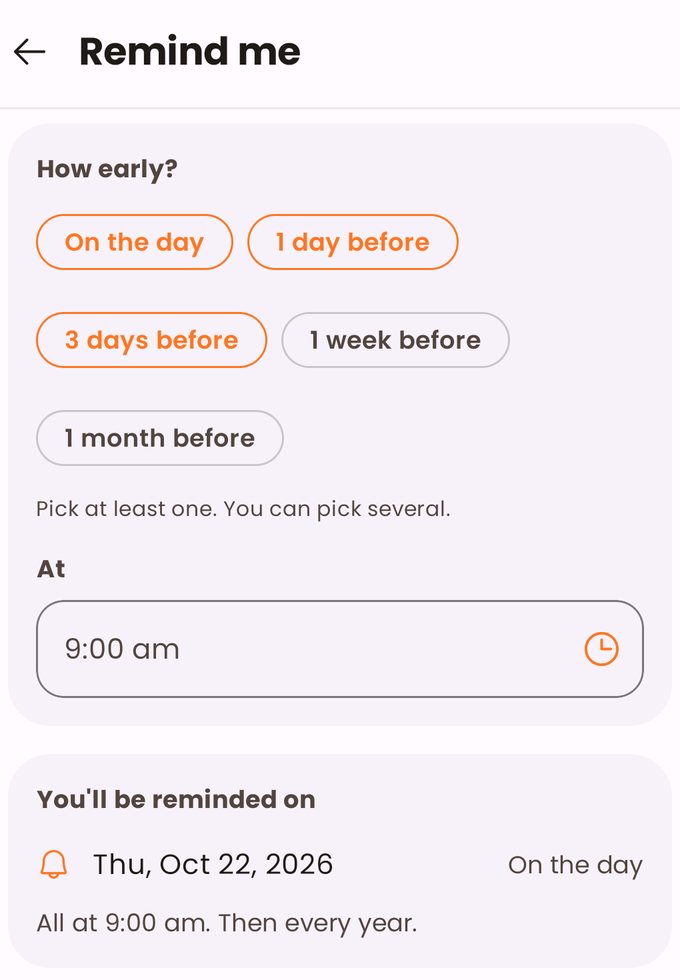
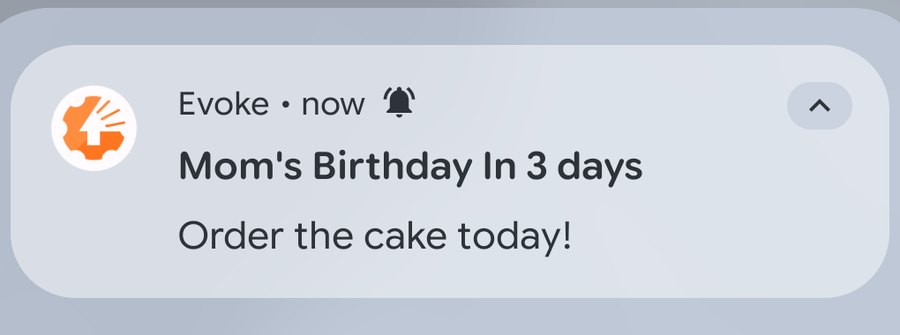
For the birthdays you can't miss, turn on Critical Alert and it rings like an alarm. A home screen widget shows the next date coming up, and if your phone was off when a reminder was due, Evoke tells you what you missed.
Remember every birthday, days before. Evoke is free on Google Play.
Which one to use
| Option | Best for | Keep in mind |
|---|---|---|
| Google Contacts | Birthdays that are already saved in your contacts | Still rolling out; fewer reminder choices |
| Google Calendar event | People who live in their calendar | You add each birthday by hand, once |
| Evoke | Several reminders days ahead, your own message, or an alarm for the big ones | The free version holds 3 date reminders |
Questions
Why isn't Google Calendar reminding me of birthdays?
Birthdays from your contacts appear on Calendar's Birthdays calendar, which has few reminder options and must be switched on to show at all. Add the birthday as your own yearly event instead, with the notifications you want.
Can I get a birthday reminder a week before?
Yes. Google Calendar lets you add a 1 week notification to a yearly event, Google Contacts offers reminders up to two weeks before, and Evoke offers 1 week and 1 month before.
Do I need to add the person to my contacts?
For Google Contacts, yes. A Google Calendar event or an Evoke reminder works without a contact.
What happens if my phone was off on the day?
Evoke tells you which reminders you missed while the phone was off, so a birthday doesn't pass silently.