 Wrenfold Labs
Guides / Subscriptions
How to remember to cancel a free trial or subscription
Find the exact date the trial ends, set a reminder for 2 days and 1 day before it, and cancel as soon as you decide. In Google Play the date is under Payments & subscriptions > Subscriptions. If the app lets you keep using it after you cancel, cancel on day one and you can't forget.
Find the exact date the trial ends
Don't count days in your head. The service tells you the date the trial turns into a paid plan:
- Apps billed through Google Play: open the Play Store, tap your profile picture, then Payments & subscriptions > Subscriptions. Each trial shows the date of the first charge.
- Services billed directly, like streaming or music services: the date is on the account or membership page of their website or app, and usually in the sign-up email.
The charge can happen at any time on that day, often around the time you signed up. Treat the day before as your real deadline.
Set two reminders: 2 days and 1 day before
One reminder is easy to swipe away when you're busy. Two give you a second chance: the first to decide, the second to act. With Evoke:
- Tap New alert, then Special date.
- Pick Free Trial and name it, for example "Music trial".
- Enter the date the trial ends. Free Trial is set to Once and reminds you 2 days and 1 day before.
- Choose the time, then tap Done.
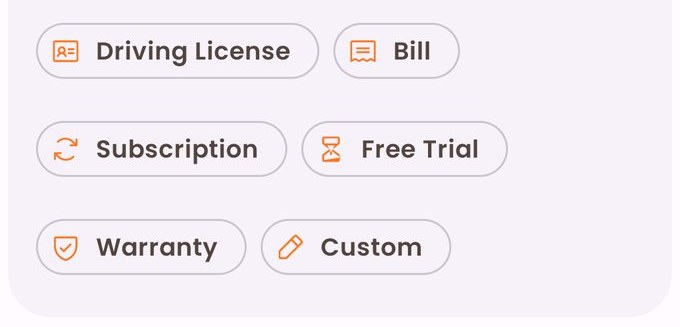
If it really matters, turn the reminder into a Critical Alert. It rings like an alarm on the full screen, then rings again at the interval and number of times you choose.
Cancel early when the app allows it
The safest trial is one you've already cancelled. Many apps on Google Play let you keep using a trial until its last day even after you cancel. Others end the trial the moment you cancel. Which one you get depends on the app, so check its terms or the message shown when you cancel. If it keeps working until the end, cancel on the first day.
How to cancel a free trial on Google Play
- Open the Play Store and tap your profile picture.
- Tap Payments & subscriptions > Subscriptions.
- Pick the subscription and tap Cancel subscription, then follow the steps.
Uninstalling the app does not cancel a subscription. You have to cancel it in the Play Store.
Warnings you may get before you're charged
Some stores, banks and governments warn you before a trial turns into a paid plan. Know what to expect where you live, but don't rely on it:
- Google Play emails you when a trial is about to end. It doesn't say how long before.
- United Kingdom: under rules due to apply to subscriptions taken out from 1 January 2027, businesses will have to send a reminder, by email, text or letter, before a free or discounted trial turns into a paid one.
- United States: there's no nationwide rule. A court struck down the FTC's "click to cancel" rule in July 2025, and the FTC started work on a new one in 2026. Some states have their own: California requires businesses to send a notice 3 to 21 days before a free trial of more than 31 days ends.
- India: under the RBI's e-mandate rules, your bank or UPI app sends a pre-debit notification at least 24 hours before each recurring payment. You can pause or cancel a UPI AutoPay mandate yourself, in your UPI app's AutoPay section.
These warnings can come just a day before, or only by email, which is why a reminder on your phone 2 days ahead is still worth having.
Subscriptions you keep: a reminder before each renewal
The same trick works for monthly plans you're not sure about. In Evoke, pick Subscription instead of Free Trial. It repeats every month and reminds you 3 days and 1 day before each renewal, so you can decide whether it's still worth paying for. A renewal on the 31st moves to the last day of shorter months.
Stop paying for trials you forgot. Evoke is free on Google Play.
Questions
Can I cancel a free trial before it ends?
Yes, and you won't be charged. Depending on the app, you either keep using it until the trial's last day or lose access straight away.
Will I be charged if I cancel on the last day?
You might. The charge can happen at any time on the last day, so cancel at least a day before.
Does uninstalling an app cancel its subscription?
No. On Google Play you have to cancel it under Payments & subscriptions > Subscriptions.
Does Google Play remind you before a free trial ends?
Yes. Google Play emails you when a trial is about to end, but it doesn't say how long before. Set your own reminder too, 2 days ahead.
How do I see all my subscriptions in one place?
For apps, the Play Store's Subscriptions list. For cards, your bank's app or statement. In India, UPI AutoPay payments are listed in your UPI app's AutoPay section.
- Google Play Help: Cancel, pause or change a subscription on Google Play
- Google Play Help: Learn about subscriptions, including trial reminder emails
- GOV.UK: Subscription contracts, draft guidance on the new rules
- Federal Register: FTC's 2026 notice on negative option rules
- California Business and Professions Code, section 17602
- Razorpay: UPI AutoPay safety, pre-debit notifications and cancelling mandates
- NPCI circular: withdrawing an e-mandate online