 Wrenfold Labs
Guides / Documents
Is it safe to keep a photo of your passport on your phone?
Yes, if you store it properly. A copy of your passport's data page helps you replace a lost passport and fill in forms. In your photo gallery, though, it can be synced to the cloud, shared by mistake or seen by anyone using your phone. Keep it in a locked, encrypted place that works offline, keep a second copy at home, and remember that a copy can't replace the passport.
Why a copy is worth having
If your passport is lost or stolen abroad, the embassy or consulate has to confirm who you are before it can help. A copy of the data page, with your passport number, issue date and photo, makes that faster. A copy also saves you digging out the passport for hotel forms, visa applications and bookings.
Governments advise the same. The US State Department suggests keeping one set of copies with you, separate from the originals, giving another to someone you trust, and taking photos of your travel documents with your phone. Australia, Canada and the UK give similar advice.
The risks of a photo in your gallery
- It's synced. Gallery photos are usually backed up to a cloud photo service and appear on your other devices.
- It's easy to share by mistake. It sits among your other photos when you pick pictures to send.
- It's in plain view. Anyone who borrows your unlocked phone can scroll past it.
- It's what identity thieves want. Your full name, date of birth, nationality and passport number are all on that one page.
How to keep a copy safely
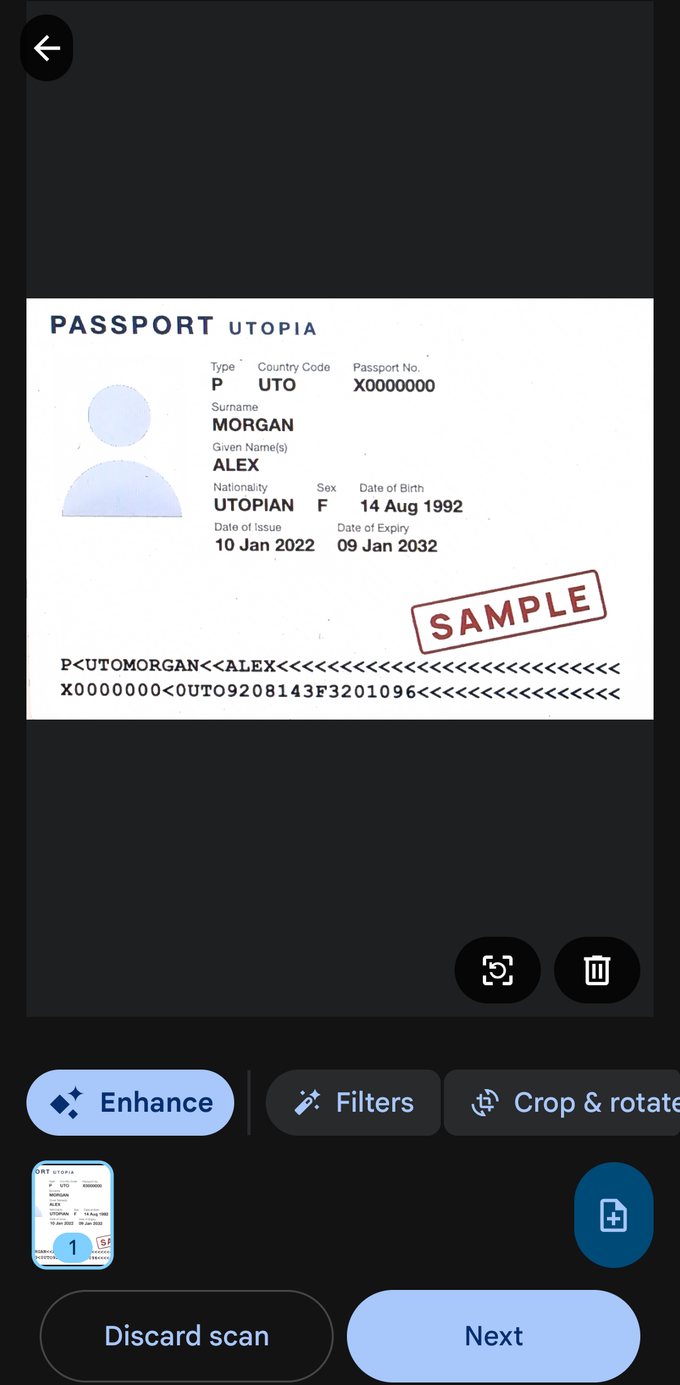
- Scan it, don't just snap it. A scan that's cropped and straightened is easier to read and to print.
- Store it locked and encrypted, in a document vault or a secure folder, not in the gallery.
- Make sure it opens offline. You may need it where there's no signal, or abroad without data.
- Add the visa pages you're travelling on, and the expiry date, so you're reminded before it runs out.
- Delete the leftovers. Remove the original photo from the gallery, chats and Downloads once the copy is saved.
- Keep a second copy with someone you trust at home, or in an encrypted backup.
- Share it only when asked, and only with the people who need it.
Step by step with Keevan
Keevan is a document vault that keeps copies encrypted on your phone and opens them with no internet. It has no account and no cloud of its own.
- Tap Add to vault, then Scan with camera, and hold the phone over the data page. The scanner finds the edges and crops the page for you.
- Scan the visa pages in the same go if you need them.
- Choose Passport, name it, and add the expiry date. Keevan reminds you 30 days before it expires.
- Tap Save. The pages are encrypted as they're saved, and open with your fingerprint, face or PIN.
For a renewal reminder months ahead rather than 30 days, see our guide on when to renew your passport.
Keep your passport copy encrypted and offline. Keevan is free on Google Play.

What a copy can and can't do
As Canada's travel advice puts it, copies can't be used as identification. They help in other ways:
| A copy on your phone can | A copy can't |
|---|---|
| Help the embassy confirm your details if the passport is lost or stolen | Get you across a border or onto a flight |
| Fill in forms and bookings without the passport at hand | Replace the passport where the original is required |
| Show your visa details and expiry dates at a glance | Prove your identity where a check of the original is required |
Questions
Can I travel with a photo of my passport?
No. Borders and airlines need the passport itself. A copy only helps you replace a lost one and fill in forms.
Should I email my passport scan to myself?
It's better than nothing as a backup, but your inbox then holds an unencrypted copy that anyone who gets into the account can see. An encrypted backup file is safer.
What if I lose my phone?
In an encrypted vault the copy can't be opened without your phone's lock or app PIN. That's also why a second copy at home or in a backup matters.
Which pages should I copy?
The data page with your photo, and any visa or residence permit pages you're travelling on.