 Wrenfold Labs
Guides / Documents
Where to store important documents on your phone, safely
Not in your photo gallery or chats, where copies get synced, shared and seen. Use a place that locks and encrypts them: Google's Safe folder in Files, Samsung's Secure Folder, private passes in Google Wallet, your government's official ID app where there is one, or a document vault app like Keevan that also works offline and reminds you before things expire. Whichever you pick, keep a backup.
Why not your gallery or WhatsApp
- Photos get backed up. A picture of your ID in the gallery is usually copied to a cloud photo service and to your other devices, often without you noticing.
- Photos get seen. Anyone you hand your unlocked phone to can scroll past it, and it shows up when you pick photos to share.
- Chats keep copies. A document sent in a chat stays in the other person's phone and in your own chat media, long after you needed it.
Your name, date of birth and ID number in one picture is exactly what identity thieves look for. Documents need a place that is locked and encrypted, not just tucked away.
Your options compared
| Option | Locked and encrypted | Works offline | Good to know |
|---|---|---|---|
| Safe folder in Files by Google | Yes, with a PIN or pattern | Yes | Not backed up to the cloud. Forget the PIN and the files can't be recovered. Android 8 and later. |
| Secure Folder on Samsung phones | Yes, a separate space protected by Samsung Knox | Yes | Samsung Galaxy phones only. |
| Google Wallet private passes | Yes, private passes need your screen lock to open | Yes, they stay on the phone | Makes a pass from a photo of an ID or insurance card. Started in the US, so check it's offered where you live. |
| Official digital IDs, such as DigiLocker (India) or IDs in Google Wallet | Protected by a government account or your screen lock | Depends on the app | They count only where they're accepted. Documents issued into DigiLocker count as originals in India. In the US, driving licences and state IDs from some states, and an ID pass made from a US passport, work at TSA security in supported airports. |
| Keevan document vault | Yes, encrypted with Android's Keystore; opens with your phone's lock or an app PIN | Yes | Scanner, expiry reminders 30 days ahead, password-protected backups. 5 items free. Android 10 and later. |
An official ID app and a vault app do different jobs. The official app holds documents your government issues, which count only where that government accepts them. A vault holds your own copies of everything else, including passports, foreign IDs, cards and insurance papers, and works with no signal.
Which documents to keep on your phone
- Passport data page and any visas
- National ID card and driving licence, front and back
- Vehicle papers: registration and insurance, plus any inspection or emissions certificate your country asks for
- Health insurance card and travel insurance
- Boarding passes and bookings for a trip
For bank cards, ask whether you need a copy at all: your bank's app already has the details. If you do keep one, keep it in an encrypted place, never in the gallery.
How to store them with Keevan
- Install Keevan. It has no account to create.
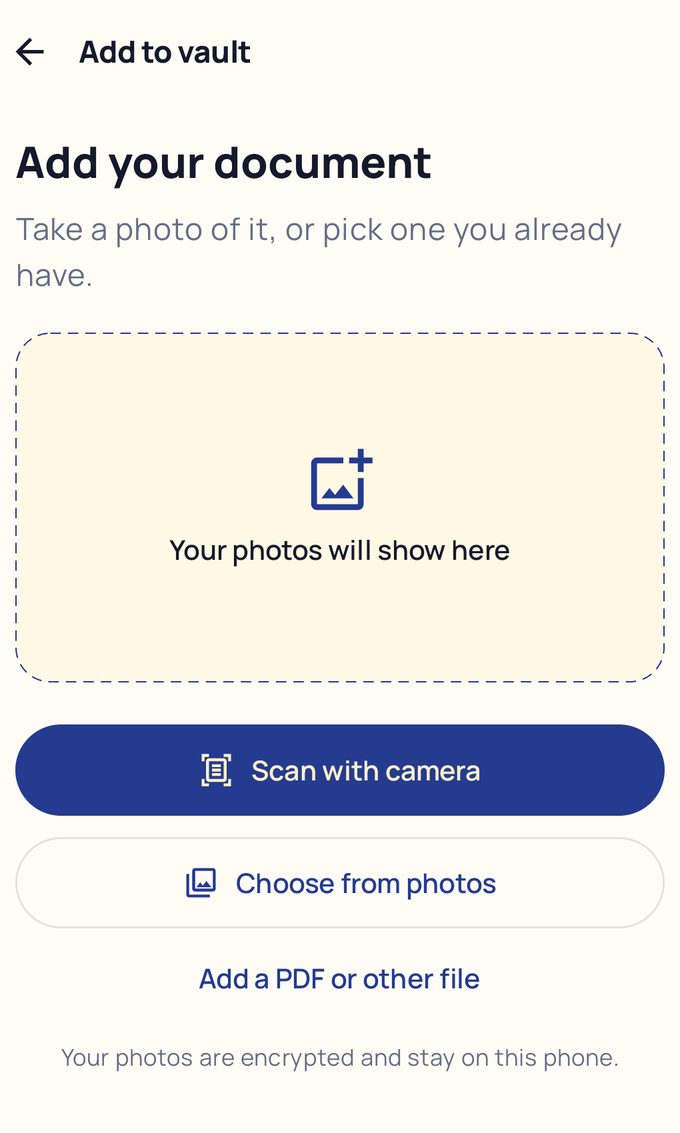
- Tap Add to vault, then Scan with camera. The scanner finds the page edges and crops it. Scan an ID front and back, or several passport pages, in one go.
- Choose what it is, give it a name and, if it has one, an expiry date. Keevan reminds you 30 days before.
- Tap Save. The pages are encrypted on your phone as they're saved.
- In Settings > Backup, tap Create Backup and choose a password. The file lets you restore everything on a new phone.
Keep your documents encrypted and offline. Keevan is free on Google Play.
Five habits that keep copies safe
- Lock the phone with a PIN, fingerprint or face, so nobody can browse it.
- Clean up after scanning. Delete the original photos from the gallery, chats and Downloads once a copy is in your vault.
- Share only when asked, and mark what the copy is for. Writing who it's for and the date across a copy stops it being reused. France's government even runs a free tool for it, FiligraneFacile.
- Keep a backup that isn't on the same phone, so losing the phone doesn't mean losing the copies.
- Keep the originals safe. A copy helps you replace a document. It rarely replaces it.
Questions
Is it safe to store documents on my phone?
Yes, if they're in a locked, encrypted place rather than the gallery, and your phone has a screen lock. Keep a backup somewhere else.
Are digital copies of my documents valid?
Usually not as a replacement for the original. The exceptions are official digital documents, and only where they're accepted: documents issued into DigiLocker in India, for example, or in the US a digital ID in Google Wallet at TSA security in supported airports. Your own copies are for reference and backup.
What happens to my documents if I lose my phone?
In an encrypted vault they can't be opened without your phone's lock or app PIN. Restore them on a new phone from your backup.
Can I open my documents with no internet?
Yes, if they're stored on the phone: Safe folder, Secure Folder, Google Wallet private passes and Keevan all work offline.
- Files by Google Help: Protect your files with Safe folder
- Samsung Support: What is the Secure Folder and how can I use it?
- Google Wallet Help: Manage items, including passes made from photos
- 9to5Google: Google Wallet private passes
- DigiLocker: issued documents are at par with originals (Rule 9A)
- 9to5Google: The US states whose IDs work in Google Wallet (October 2026)
- Google Wallet Help: Create an ID pass from your passport
- Government of France: FiligraneFacile, add a watermark to a document